

How to Effectively Outsource Web Design In 2026
Outsource web design the wrong way and you’ll get a pretty mockup that doesn’t ship, a site that’s slow on mobile, or a CMS your team can’t maintain. Outsource web design the right way and you get a faster launch, better conversion, and a website your internal team can run without vendor dependency.
In 2026, outsourcing is less about “cheap design” and more about assembling a cross-functional delivery system: UX + UI + content + front-end + performance + accessibility + QA. The best outcomes come from clear scope, measurable acceptance criteria, and a vendor who collaborates like an extension of your team - not a disconnected production shop.
This guide breaks down what outsourcing website design really means, when it makes sense, what it costs, and a practical 2026 playbook (vendor scorecard + SOW checklist) you can use before you sign anything.
Get Started Learn More View PortfolioWhat is outsourcing web design? (web design outsource)
Outsourcing web design means hiring a person or team outside your company to plan, design, and often build all or part of your website. That can be as small as a landing page refresh, or as big as a full redesign that includes information architecture, a design system, CMS setup, and front-end development.
Here’s the key distinction many teams miss: design deliverables aren’t the same as a working website. A modern outsourcing partner may provide:
- UX work: user flows, navigation, wireframes, conversion journeys
- UI work: visual design, components, responsive states, prototypes
- Design systems: tokens, components, usage rules for consistency
- Implementation: Webflow/WordPress/Shopify theme work or a custom front end
- Quality: accessibility, performance, cross-browser testing
If you also need implementation, you’re effectively outsourcing web design + web development (and you should evaluate vendors accordingly).
If you’re comparing outsourcing models (nearshore/offshore) for delivery and time zones, start with our nearshore software development guide.
Why outsource web design in 2026? (outsource web design services)
Companies outsource web design services for three practical reasons: speed, specialization, and focus.
1) Faster execution without adding headcount
Hiring full-time is slow, and in 2026 the skill set is broad: responsive UI, accessibility, performance, CMS architecture, analytics, and sometimes AI personalization. Outsourcing lets you spin up the right mix for your project window.
2) Higher quality through specialization
A strong agency or senior freelancer has patterns, checklists, and reusable systems from dozens of launches. That matters for measurable outcomes like mobile UX and conversion rate - not just aesthetics.
A concrete example: Shopify cites performance and conversion impact, referencing data that pages loading in ~1 second can convert significantly better than slower pages (source: Tooltester’s loading-time stats: https://www.tooltester.com/en/blog/website-loading-time-statistics).
3) Better use of internal team time
Your marketing, product, and engineering teams can focus on strategy and core product work instead of managing UI edge cases, layout bugs, or CMS migrations.
What to outsource (and what to keep in-house)
The safest way to outsource web design is to outsource outcomes (deliverables + acceptance criteria), while keeping decision-making in-house.
Great candidates to outsource
- Discovery & UX mapping (especially if your navigation and content sprawl has grown)
- UI design + component library (to enforce consistency across pages)
- Front-end build (especially if you need a high-polish, responsive experience)
- CMS setup and templates (so your team can publish without dev help)
- Performance & accessibility remediation (Core Web Vitals + WCAG)
Usually better to keep in-house (or co-own)
- Business priorities and positioning (the vendor can help, but you must own it)
- Final content approval (voice, legal claims, compliance)
- Analytics definitions (what counts as a lead, signup, demo request)
- Stakeholder alignment (outsourcing can’t fix internal indecision)
Tip
Outsource execution-heavy work, but keep a single internal owner accountable for scope, approvals, and launch readiness.
Engagement models: freelancer vs agency vs dedicated team (web development outsourcing companies)
[.h6] Best for
- Small, well-defined tasks (a landing page, UI tweaks) Trade-offs
- You manage the process end-to-end
- Limited redundancy if they’re unavailable
If you’re evaluating web development outsourcing companies, ask directly: Who does UX? Who does front-end? Who owns QA? Many vendors sell “design” but subcontract development, which can create delays and mismatched quality standards.
For a broader partner-selection framework, see our software co-development partner guide.
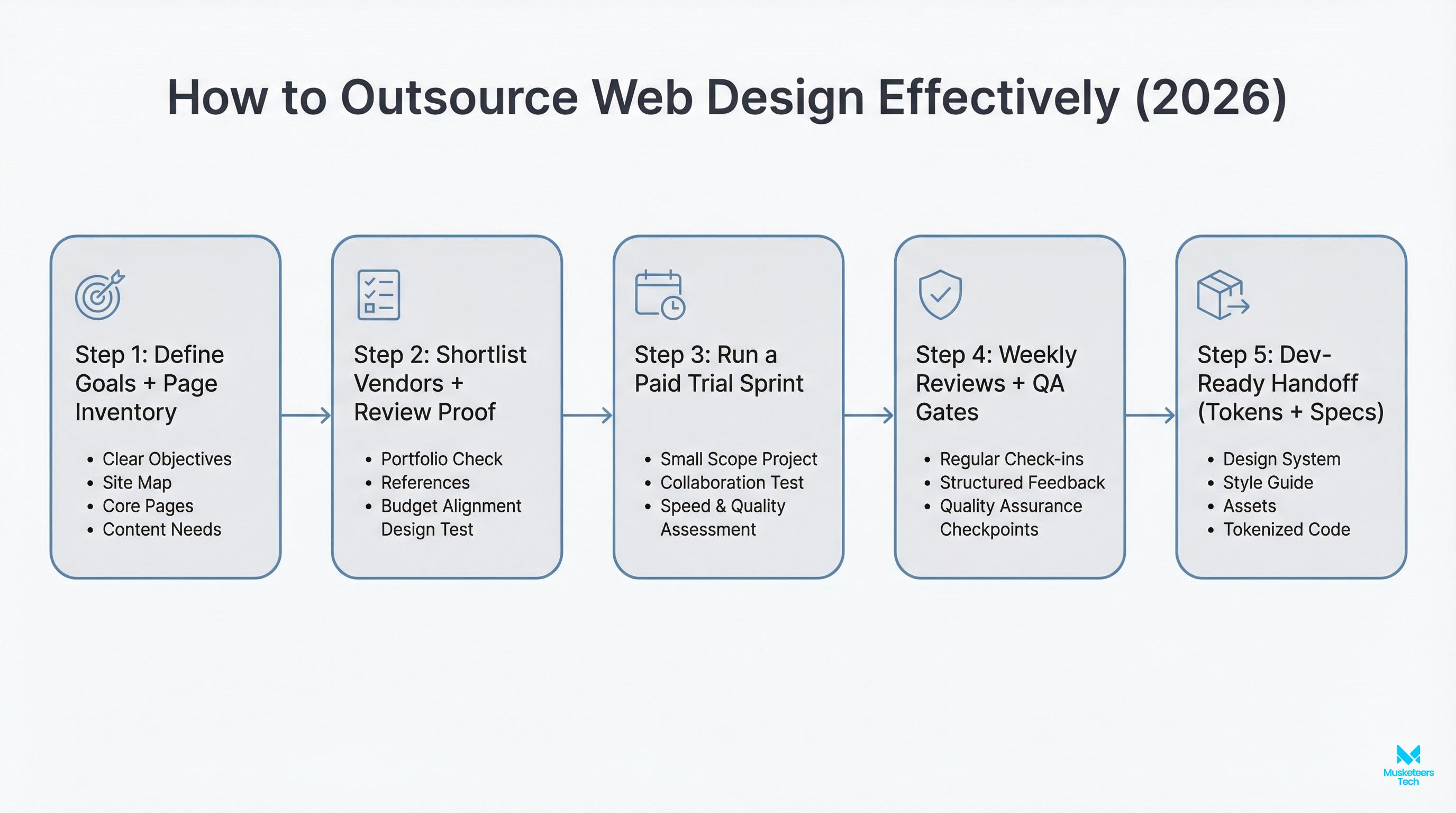
How to outsource web design: a step-by-step process (how to outsource web design)
This workflow is designed to reduce risk and prevent the two most common failures: scope drift and “design that can’t be built.”
1) Write a brief that includes constraints (not just goals)
Include:
- Target audience + top user journeys
- Pages/templates needed (not just “a new site”)
- Platform constraints (WordPress, Shopify, headless, etc.)
- Non-negotiables: accessibility level, performance targets, SEO migration needs
Don't skip constraints
Constraints help vendors give accurate estimates and prevent change orders later.
2) Shortlist vendors with evidence, not promises
Ask for:
- 2–3 relevant case studies (similar complexity)
- A sample component library or design system work
- A breakdown of roles assigned to your project
3) Run a paid test sprint before committing
A 1–2 week sprint can produce:
- Updated homepage wireframe + visual direction
- A small component set
- A build feasibility check (what’s easy vs expensive)
Why a paid test sprint works
You’ll see real collaboration quality and reduce the chance of picking the wrong partner.
4) Lock scope, milestones, and acceptance criteria
Define what “done” means. Examples:
- Page templates implemented and responsive at agreed breakpoints
- Lighthouse performance baseline and improvement plan
- Accessibility checks (e.g., WCAG 2.2 AA as a target where applicable)
For Core Web Vitals context and best practices, Google’s web.dev is a solid reference: https://web.dev/vitals/
5) Build → QA → launch with a real checklist
- 301 redirects + metadata preserved (SEO migration)
- Form tracking and analytics events validated
- Cross-browser testing + device testing
- Content freeze date + rollback plan
Cost to outsource a website in 2026 (what drives pricing)
How much does it cost to outsource a website? depends less on page count and more on complexity and risk.
Typical pricing ranges you’ll see
- Small business / brochure site: often low-to-mid four figures to low five figures
- Mid-market marketing site redesign (multiple templates + CMS): commonly five figures
- Complex builds (integrations, personalization, multi-language, custom components): higher five figures and up
Pricing models
- Fixed price (best when scope is stable)
- Time & materials (best when requirements evolve)
- Retainer (best for ongoing improvements)
Cost drivers to plan for
- CMS migration and content cleanup
- Custom animations/interactions
- Accessibility remediation
- Performance optimization (especially on mobile)
- QA and post-launch support
If you’re deciding between regions (e.g., outsource web design to India, outsource web design Philippines), balance labor savings with collaboration needs, overlap hours, and quality controls. The biggest hidden cost is rework caused by unclear requirements.
The 2026 outsourcing playbook (vendor scorecard + SOW checklist)
Competitors explain the concept well—but most don’t give you a governance toolkit. Use this to protect budget, timeline, and quality.
A) Vendor evaluation scorecard (quick rubric)
Score each vendor 1–5:
- Relevant proof: similar launches, measurable outcomes
- Team composition: UX + UI + front-end + QA coverage
- Process clarity: how they run discovery, reviews, handoff
- Communication: response time, meeting cadence, documentation
- Quality gates: accessibility, performance, testing approach
- Ownership: do you own source files, repos, and design system?
- Security posture: NDA readiness, access control, tooling hygiene
If you need an executive owner to run vendor selection, milestones, and delivery governance, consider CTO as a Service.
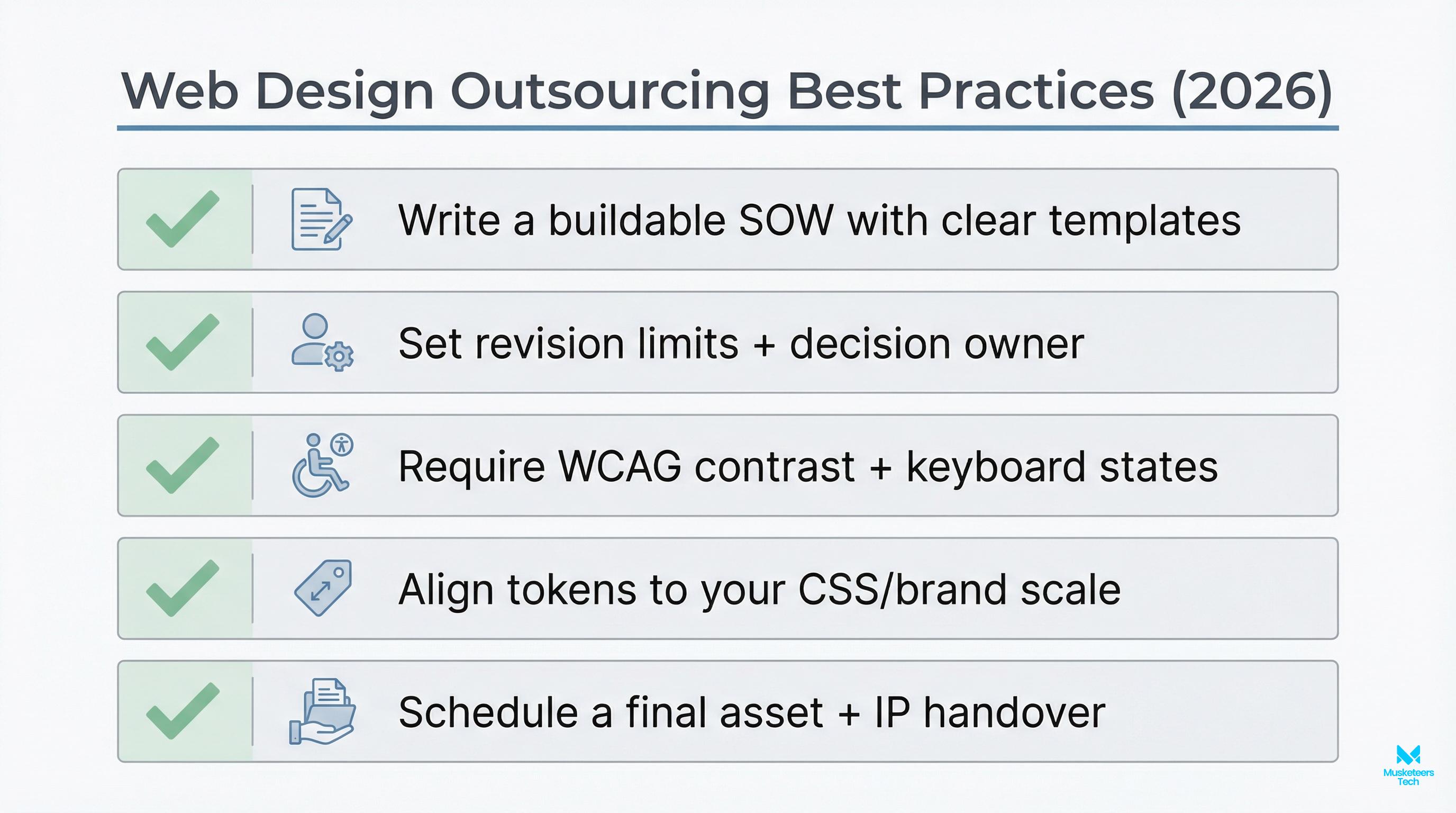
B) SOW checklist (non-negotiables to put in writing)
Include clauses for:
- Deliverables: Figma files, component library, coded templates, CMS setup
- Acceptance criteria: responsive breakpoints, browser support, QA scope
- Performance budget: target metrics and what happens if missed
- Accessibility target: e.g., WCAG 2.2 AA (where applicable) + testing method
- SEO migration: redirects, metadata, sitemap, indexing plan
- IP ownership: you own designs, code, and content upon payment
- Licensing: fonts, stock photos, plugins—who pays and who owns
- Post-launch support: bug window, SLAs, maintenance options
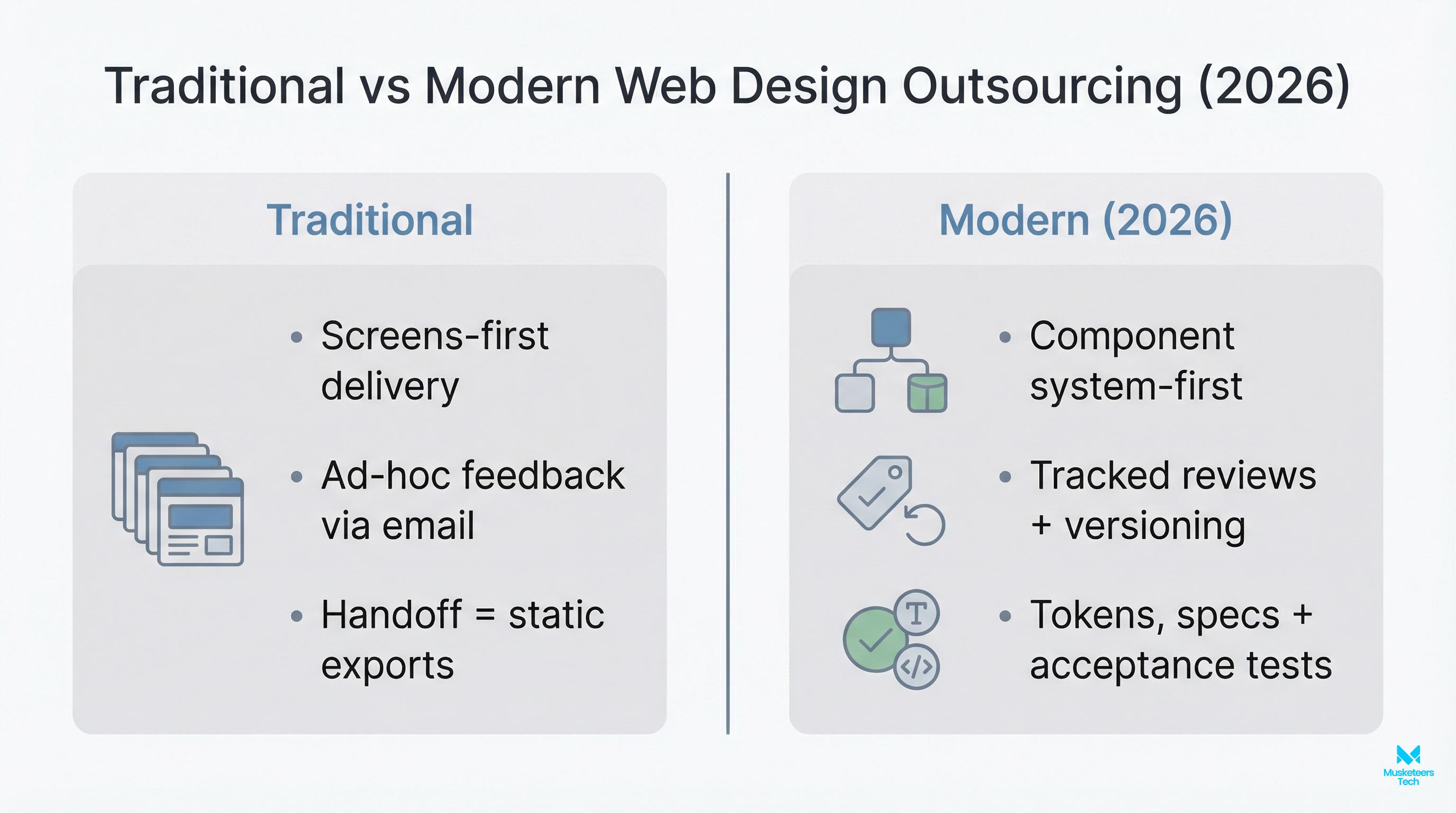
C) “Design-to-dev” handoff in the AI era
In 2026, many teams use AI tools to speed up production. That’s great—if you still enforce standards.
Best practice workflow:
- Design in Figma with a named component library
- Use a shared token system (colors, spacing, typography)
- Implement with a component framework (React/Vue or platform-native themes)
- Use AI (e.g., code assistants) to accelerate—but require code review + QA
- Validate accessibility and performance before launch, not after
Tools & platforms that make outsourcing easier
- Design: Figma (components, prototyping), FigJam (workshops)
- Build platforms: Webflow, WordPress, Shopify (when speed matters)
- Project management: Jira, Linear, ClickUp
- Documentation: Notion, Google Docs
- Async reviews: Loom for walkthroughs, annotated screenshots
- Engineering: GitHub/GitLab, CI checks, preview deployments
Frequently Asked Questions (FAQs)
For simple sites, outsourced work can be a few thousand dollars; for redesigns and more complex builds (CMS, integrations, custom components), it often moves into five figures. The biggest cost drivers are complexity, content migration, QA, accessibility, and performance requirements.
How Musketeers Tech Can Help
If you want to outsource web design without losing control, Musketeers Tech can run the full delivery lifecycle: discovery, UX/UI, front-end build, CMS integration, QA, and post-launch optimization. We’re especially useful when you need more than “a designer” - you need a partner who can translate business goals into shipped, measurable outcomes.
Our teams handle modern web builds and product-grade interfaces through our Web Application Development service. If you’re launching something new, we can also scope and deliver quickly through MVP Development Services, ensuring your site supports growth, experiments, and iteration.
Want proof? Explore the breadth of solutions we’ve shipped in our portfolio from AI-driven experiences to full digital transformations.
Web Application Development
From UX to front-end and CMS, we ship fast, responsive websites.
Final Thoughts
To outsource web design effectively in 2026, focus on clarity and control: define scope, choose the right engagement model, run a paid test sprint, and put acceptance criteria in writing. Most outsourcing failures aren’t caused by talent—they’re caused by vague requirements, missing quality gates, and unclear ownership.
If you use the vendor scorecard and SOW checklist in this guide, you’ll dramatically reduce rework and keep momentum through launch. You’ll also avoid the common trap of buying “design” and discovering later that no one planned for performance, accessibility, SEO migration, or maintainability.
Next steps
- Explore our Web Application Development services
- See our portfolio of recent projects
- Read the Nearshore Software Development Guide and the Software Co-Development Partner Guide
Last updated: 03 Feb, 2026
