


You’ve Outgrown Lovable: How to Move Your App to AWS and Remove the Branding for Good
Lovable is an incredible tool for going from idea to working prototype in hours. But prototypes don’t stay prototypes forever. The moment you start acquiring real users, handling real data, or pitching to investors who ask “where is this hosted?”, the cracks show. Lovable’s managed hosting puts a ceiling on what you can control — and that branded footer tells the world your product isn’t fully yours yet. This guide walks you through every step of migrating your Lovable app to AWS and removing the branding permanently, so you own your stack, your domain, and your reputation.
If you’ve been searching for lovable alternatives or wondering how to self-host your Lovable app, you’re not alone. Thousands of builders hit this exact inflection point every month — and the search volume for “lovable dev deploy aws” is climbing fast. The good news: the migration is entirely doable, and by the end of this post, you’ll have a production-grade AWS deployment with zero Lovable branding.
Signs You’ve Outgrown Lovable
Not every app needs to migrate. Lovable’s managed hosting works fine for internal tools, demos, and early-stage MVPs. But there are clear signals that you’ve hit the ceiling.
The first is branding and credibility. Lovable’s subdomain and branded elements signal “prototype” to customers, investors, and partners. If you’re charging for your product or presenting it in a commercial context, third-party branding undermines trust. The second is hosting control. You can’t configure CDN caching, set custom headers, manage SSL certificates the way you need, or fine-tune server-side behavior. The third is cost at scale. Lovable’s pricing works at low traffic, but as your app grows, AWS gives you dramatically better unit economics — especially when you combine S3, CloudFront, and Amplify.
Other red flags include needing custom backend logic beyond Supabase, wanting a CI/CD pipeline integrated with your existing tooling, or requiring compliance certifications (SOC 2, HIPAA) that mandate infrastructure you control.
When to Stay on Lovable
If your app is still in active prototyping, you’re iterating on the UI weekly, and you have fewer than 100 users, stay on Lovable. The migration effort isn’t worth it until you’ve stabilized the product. Use this guide as your playbook for when you’re ready.
What You’re Actually Paying for on Lovable Cloud
Before migrating, understand what Lovable’s managed hosting bundles together — because you’ll need to replicate each piece on AWS.
Lovable Cloud gives you a deployment pipeline (push-to-deploy from their editor), a hosting layer (their infrastructure serves your built files), SSL certificates (auto-provisioned), and a subdomain (yourapp.lovable.app). For the free tier, that’s a fine deal. But the moment you need a custom domain, professional branding, or more than basic analytics, you’re paying for convenience you could own for less.
On AWS, the equivalent stack — S3 for static hosting, CloudFront for CDN and SSL, Route 53 for DNS, and Amplify for CI/CD — typically costs $1-5/month for apps serving under 100,000 requests per day. Compare that to Lovable’s paid tiers, and the math is clear: cloud computing delivers better economics at scale.
| Component | Lovable Cloud | AWS Equivalent | AWS Cost (est.) |
|---|---|---|---|
| Static Hosting | Included | S3 Bucket | ~$0.023/GB |
| CDN | Included | CloudFront | ~$0.085/GB |
| SSL Certificate | Auto | ACM (free) | $0 |
| Custom Domain | Paid plans | Route 53 | $0.50/zone/month |
| CI/CD Pipeline | Built-in editor | Amplify / GitHub Actions | Free tier available |
| Total (low traffic) | $20-45/month | S3 + CF + Route 53 | $1-5/month |
AWS Architecture for Your Lovable App
Lovable generates React + Vite applications with Tailwind CSS and shadcn/ui components. When you export the code, you get a standard single-page application (SPA) that can be deployed anywhere static files are served. Here’s the production-grade AWS architecture:
Best for static SPAs with no server-side rendering. Your built files sit in an S3 bucket, CloudFront serves them globally with edge caching and SSL, and Route 53 handles DNS. This is the cheapest and most common path.
Components: S3 (origin) → CloudFront (CDN + SSL) → Route 53 (DNS) → Your custom domain
Best for: Marketing sites, dashboards, tools, and apps where all data comes from a Supabase or external API.
Both paths give you full control over caching, headers, redirects, and SSL — things Lovable Cloud doesn’t expose.
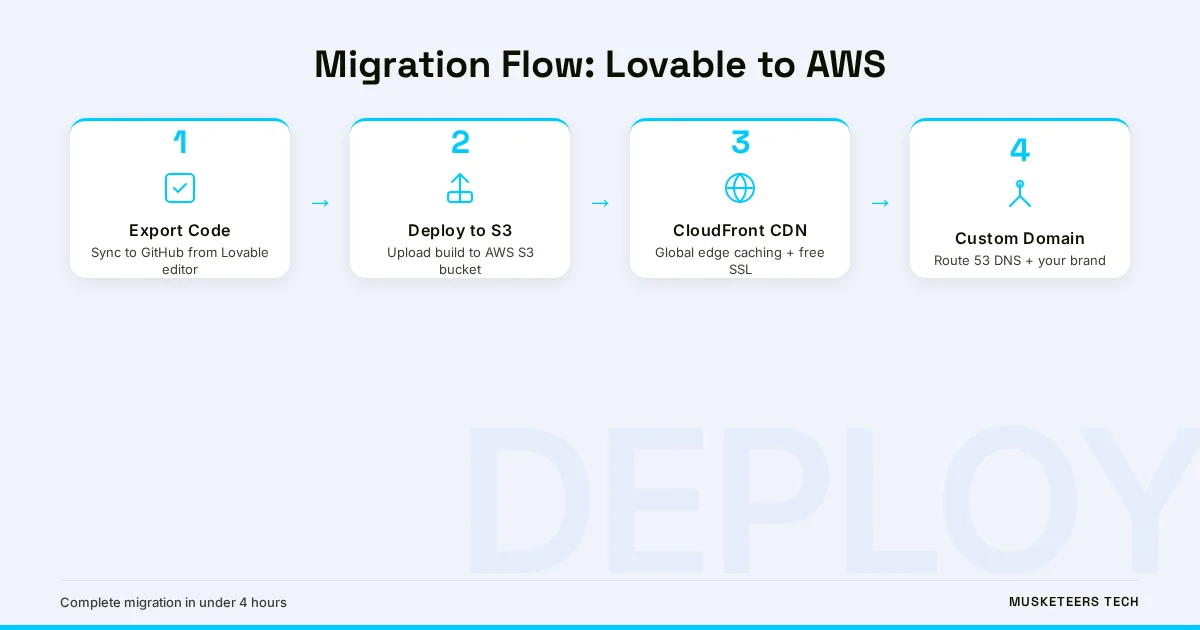
Step-by-Step: Migrating from Lovable to AWS
This is the core migration walkthrough. Follow these steps in order, and you’ll have your app running on AWS within an afternoon.
Step 1 — Export Your Code from Lovable
Open your Lovable project, click “Code” in the top bar, and sync to a GitHub repository. Lovable creates a standard Vite project structure with package.json, src/, public/, and config files. Clone the repo locally and verify you can build it:
git clone https://github.com/your-org/your-lovable-app.git
cd your-lovable-app
npm install
npm run build
The dist/ folder is your production build — the static files you’ll deploy to S3.
Step 2 — Create an S3 Bucket for Hosting
In the AWS Console (or via CLI), create an S3 bucket named after your domain (e.g., app.yourdomain.com). Enable static website hosting and set index.html as both the index and error document (critical for SPA routing):
aws s3 mb s3://app.yourdomain.com
aws s3 website s3://app.yourdomain.com --index-document index.html --error-document index.html
Upload your build artifacts:
aws s3 sync dist/ s3://app.yourdomain.com --deleteStep 3 — Set Up CloudFront for CDN and SSL
Create a CloudFront distribution pointing to your S3 bucket as the origin. Request a free SSL certificate from AWS Certificate Manager (ACM) for your custom domain. Key settings:
- Origin: S3 bucket website endpoint (not the REST endpoint)
- Viewer Protocol Policy: Redirect HTTP to HTTPS
- Default Root Object:
index.html - Custom Error Responses: 403 and 404 both return
/index.htmlwith status 200 (SPA routing) - Alternate Domain Names (CNAMEs):
app.yourdomain.com - SSL Certificate: Select your ACM certificate
Step 4 — Configure Route 53 DNS
Create a hosted zone for your domain in Route 53 (if you haven’t already). Add an A record (alias) pointing app.yourdomain.com to your CloudFront distribution. DNS propagation takes 5-30 minutes.
Step 5 — Verify the Deployment
Hit your custom domain in the browser. You should see your Lovable app running — same functionality, no Lovable subdomain, no Lovable branding, served from your own infrastructure with your own SSL certificate.
Checkpoint
At this point, your app is live on AWS with a custom domain. The remaining steps cover branding removal, backend migration, and CI/CD automation.
Removing the Lovable Branding for Good
Exporting to your own hosting is half the battle. You also need to strip every trace of Lovable’s branding from the code and metadata.
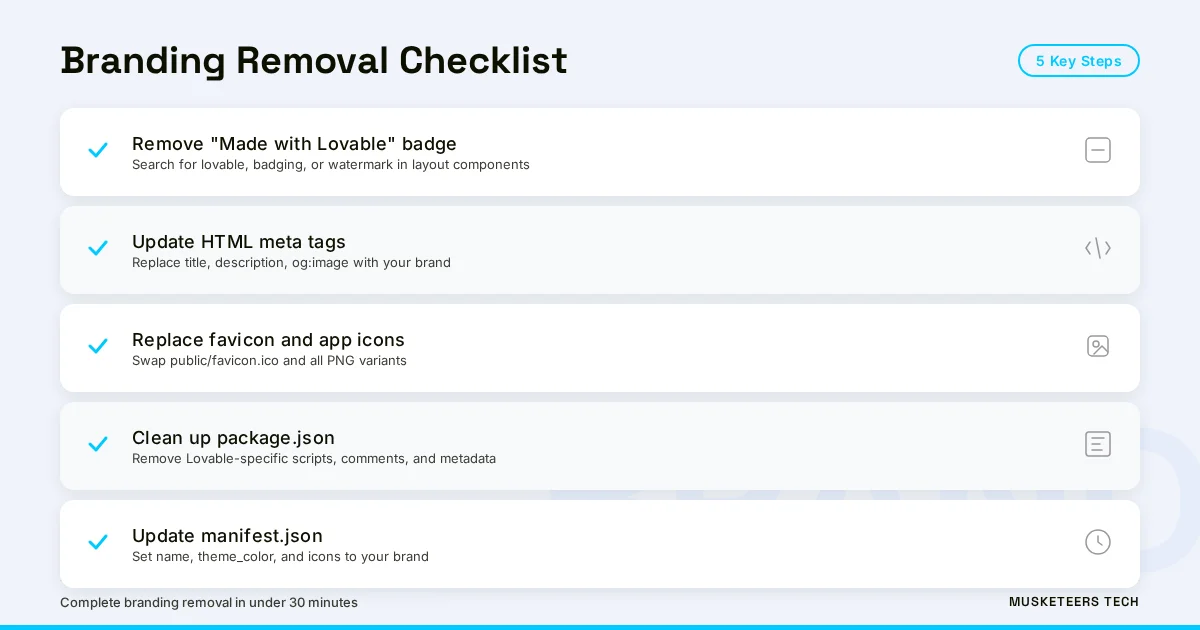
- Remove the “Made with Lovable” badge — Search your codebase for
lovable,badging, orwatermarkreferences. Checksrc/App.tsx,src/main.tsx, and layout components. Delete or replace any badge components. - Update the HTML metadata — Open
index.htmland replace any Lovable-generated<meta>tags (title, description, og:image) with your own brand’s metadata. - Replace the favicon — Lovable sets a default favicon. Replace
public/favicon.icoand anypublic/favicon-*.pngfiles with your brand’s icons. - Audit
package.json— Remove any Lovable-specific scripts, comments, or metadata fields that reference the platform. - Clean up the
manifest.json— If your app has a web app manifest, update thename,short_name,theme_color, andiconsto reflect your brand.
After these changes, rebuild and redeploy:
npm run build
aws s3 sync dist/ s3://app.yourdomain.com --delete
aws cloudfront create-invalidation --distribution-id YOUR_DIST_ID --paths "/*"
The CloudFront invalidation ensures cached copies of the old branded version are purged globally.
Migrating Your Backend: Supabase, Auth, and Database
Most Lovable apps use Supabase for authentication, database, and storage. The good news: Supabase is already a standalone service. Your migration doesn’t require moving away from Supabase — you just need to ensure your app connects directly to your own Supabase project rather than through any Lovable-managed proxy.
What to verify:
Check your .env or environment configuration for SUPABASE_URL and SUPABASE_ANON_KEY. These should point to your Supabase project (e.g., https://yourproject.supabase.co), not to any Lovable intermediary. If you created the Supabase project through Lovable’s integration, you already own it — the credentials are yours.
If you want to move off Supabase entirely (to RDS, DynamoDB, or a self-managed Postgres instance), that’s a larger digital transformation effort. For most teams, keeping Supabase while migrating hosting to AWS is the right first step — it isolates the deployment migration from the data migration.
Don't Break Auth During Migration
If your app uses Supabase Auth with OAuth providers (Google, GitHub), update the redirect URLs in both your Supabase dashboard and OAuth provider settings to point to your new custom domain. Forgetting this step will lock users out of your app.
Setting Up CI/CD for Automatic Deployments
Manually running aws s3 sync after every code change doesn’t scale. Set up a CI/CD pipeline so every push to main automatically builds and deploys your app.
Create .github/workflows/deploy.yml:
name: Deploy to AWS
on:
  push:
    branches: [main]
jobs:
  deploy:
    runs-on: ubuntu-latest
    steps:
      - uses: actions/checkout@v4
      - uses: actions/setup-node@v4
        with:
          node-version: 20
      - run: npm ci && npm run build
      - uses: aws-actions/configure-aws-credentials@v4
        with:
          aws-access-key-id: ${{ secrets.AWS_ACCESS_KEY_ID }}
          aws-secret-access-key: ${{ secrets.AWS_SECRET_ACCESS_KEY }}
          aws-region: us-east-1
      - run: aws s3 sync dist/ s3://app.yourdomain.com --delete
- run: aws cloudfront create-invalidation --distribution-id ${{ secrets.CF_DIST_ID }} --paths "/*"Both approaches give you push-to-deploy — the same convenience Lovable offered, but on infrastructure you control. For teams evaluating AWS optimization strategies, Amplify is often the path of least resistance.
Cost Comparison: Lovable Cloud vs. AWS Self-Hosted
Here’s the real-world cost comparison for a typical SPA serving 50,000 monthly users with moderate API traffic:
| Metric | Lovable Cloud (Pro) | AWS (S3 + CloudFront + Route 53) |
|---|---|---|
| Monthly hosting cost | $20-45 | $2-5 |
| Custom domain | Paid plans only | $0.50/zone/month |
| SSL certificate | Auto (paid plans) | Free (ACM) |
| CDN edge locations | Limited | 400+ global PoPs |
| Build minutes/month | Plan-limited | 1,000 free (Amplify) |
| Cache control | No access | Full header control |
| Infrastructure ownership | None (vendor-locked) | Full ownership |
| Branding | Lovable badge on free tier | Zero third-party branding |
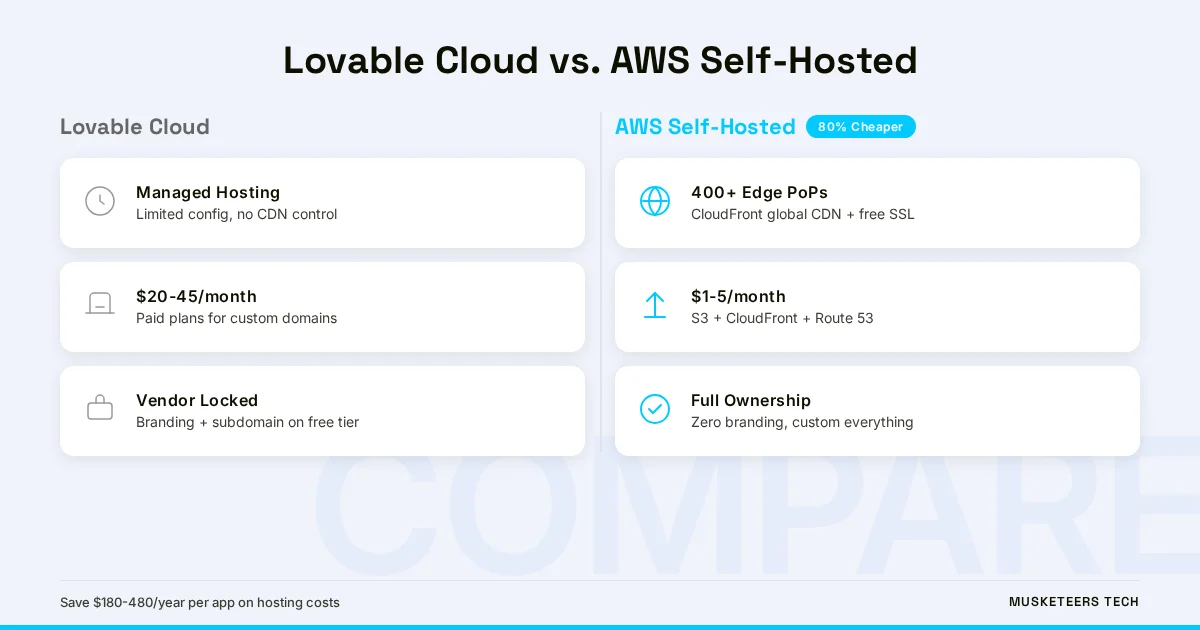
For startups watching burn rate, the savings compound quickly. A team running three apps on Lovable Pro ($135/month) could host all three on AWS for under $15/month total — and that’s before negotiating reserved pricing or using AWS cost optimization automation.
Hidden Cost: Developer Time
The upfront migration takes 2-4 hours for a standard Lovable app. After that, the CI/CD pipeline means deployments are automatic. The breakeven point — where AWS savings exceed the migration time investment — is typically reached within the first month.
Frequently Asked Questions
Export your Lovable project to GitHub, run npm run build to generate static files, then deploy the dist/ folder to an S3 bucket with CloudFront in front for CDN and SSL. The full walkthrough is in the “Step-by-Step” section above. The entire process takes 2-4 hours for a standard Lovable SPA.
How Musketeers Tech Can Help
Migrating a single Lovable app is straightforward. But when you’re running multiple vibe-coded apps, managing Supabase backends across environments, or need enterprise-grade infrastructure with monitoring, autoscaling, and compliance — that’s where software strategy consulting matters. Musketeers Tech has helped dozens of teams transition from no-code and low-code platforms to production-grade AWS architectures without losing momentum.
We’ve built migration playbooks for teams outgrowing every type of software development platform — from Bubble and Retool to Lovable and Bolt. Whether you need a one-time migration or an ongoing CTO-as-a-Service engagement to manage your cloud infrastructure, we can help you own your stack without slowing down product development. See how we’ve built professional web applications from the ground up and delivered digital transformation for growing organizations.
AWS Cost Optimization
Cut your AWS bill by up to 40% with automated right-sizing, reserved instances, and architecture reviews.
Web Application Development
Production-grade React, Next.js, and full-stack applications deployed on AWS with CI/CD from day one.
Own Your Stack, Own Your Future
Lovable got your app off the ground fast — and that’s exactly what it’s built for. But every serious product eventually needs infrastructure it controls: custom domains, clean branding, predictable costs, and deployment pipelines that integrate with how your team actually works. The migration from Lovable to AWS isn’t a rejection of no-code or vibe coding — it’s the natural next step when your product is ready to stand on its own.
The tools are accessible, the costs are lower than what you’re paying now, and the process is well-documented. Take the afternoon, make the move, and ship your product on your terms.
AI-optimized version of this article: Read the text-only version
Last updated: 16 Mar, 2026
