

You’ve Outgrown Replit: How to Move Your App to AWS and Take Full Control of Your Stack
Replit is one of the fastest ways to go from an idea to a running application. Its AI Agent writes code, provisions databases, and deploys your app in minutes — all inside a browser. But speed has trade-offs. The moment your user base grows beyond a few hundred, your deployment credits start vanishing, or a client asks “can we host this on our own infrastructure?”, you discover that Replit’s convenience comes at the cost of control. This guide walks you through migrating your Replit app to AWS — frontend, backend, database, and all — so you own every layer of your stack.
If you’ve been searching for replit alternatives or trying to figure out how to deploy a Replit app to production-grade infrastructure, you’re in good company. The $113 CPC on “replit hosting limitations” tells you how many teams are hitting this wall. The good news: the migration is entirely doable in a weekend, and the result is a faster, cheaper, more flexible deployment that you fully control.
Key Takeaways
- Replit apps are standard codebases — Node.js, Python, or React projects that can be exported and deployed anywhere once you understand their structure.
- Three AWS deployment paths — S3 + CloudFront for SPAs, EC2/ECS for full-stack backends, and Amplify for managed full-stack. Choose based on your app’s architecture.
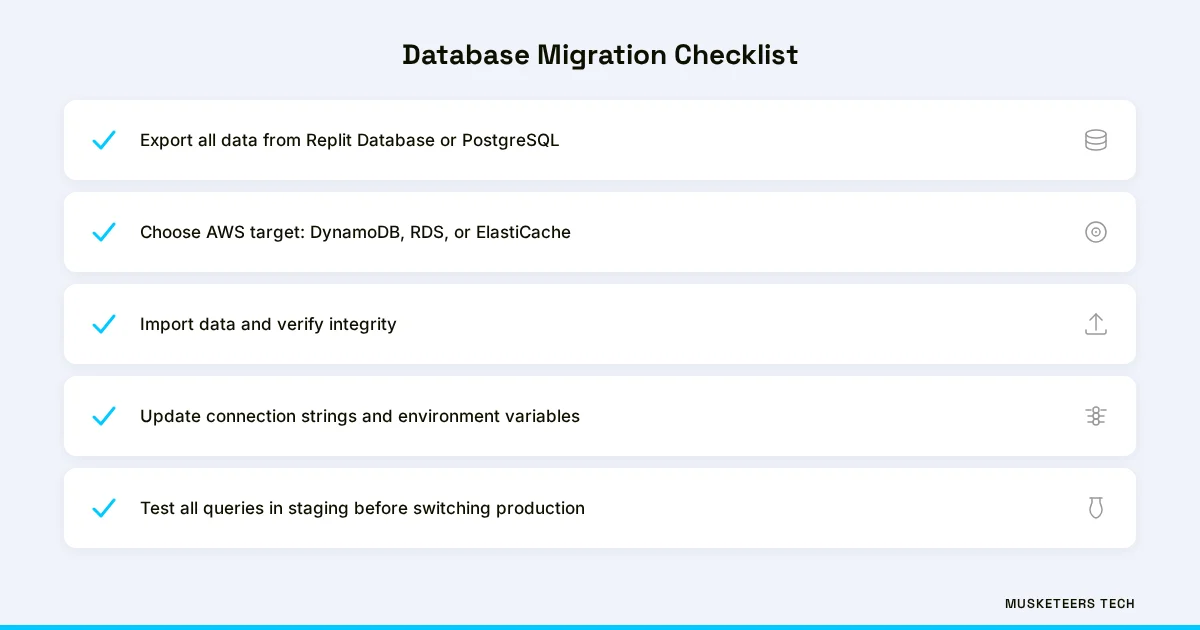
- Database migration is the hardest part — Moving from Replit Database or PostgreSQL to AWS-native services requires careful data export and connection string updates.
- Cost savings are dramatic — Replit Deployments cost $7-20+/month per app. The equivalent AWS stack costs $1-15/month with far more capacity and zero credit limits.
- CI/CD replaces Replit’s push-to-deploy — GitHub Actions or AWS Amplify give you the same one-push deployment experience on your own infrastructure.
When to Migrate Away from Replit
Not every Replit project needs a migration. If you’re prototyping, learning, or running an internal tool with five users, Replit is excellent. But there are clear inflection points where staying on Replit starts costing you more than leaving.
The first is deployment credits and pricing. Replit uses a credit-based system for AI assistance and deployments. It’s easy to burn through credits without realizing it — especially with the Replit Agent, which consumes credits on every interaction. Once you’re paying $25/month for the Hacker plan and still running out of credits, the economics stop making sense.
The second is hosting control and performance. Replit Deployments run on shared infrastructure with cold starts and no CDN configuration. You can’t set custom cache headers, configure edge locations, manage SSL certificates your way, or tune server-side performance. For apps serving real users, that matters.
The third is compliance and ownership. Enterprise clients, healthcare apps, and fintech products often require infrastructure you control — SOC 2, HIPAA, or simply the ability to tell an auditor exactly where your data lives. Replit’s hosted environment doesn’t give you that.
When to Stay on Replit
If your app is still in active development, you’re iterating on features daily, and you have fewer than 100 users, stay on Replit. The migration effort isn’t worth it until your product has stabilized. Bookmark this guide for when you’re ready.
Understanding Replit App Architecture
Before migrating, you need to understand what Replit actually generates — because unlike Lovable, which outputs React SPAs, Replit builds full-stack applications with several moving parts.
A typical Replit app includes a server process (Node.js with Express, Python with Flask/FastAPI, or another backend framework), a frontend (React, HTML/CSS/JS, or a template engine), a database (Replit Database, a key-value store, or a PostgreSQL instance through Replit’s managed Postgres), environment variables (stored in Replit Secrets), and a deployment configuration (the .replit file and replit.nix for system dependencies).
Most Replit-generated apps use Express.js as the server. The entry point is typically index.js or server.js. The app listens on port 3000 or whatever process.env.PORT provides. Static files are served from a public/ or dist/ directory.
Key files to identify: index.js or server.js (entry point), package.json (dependencies), .env or Replit Secrets (environment variables), public/ or client/ (frontend assets)
AWS Architecture Options for Replit Apps
Unlike frontend-only platforms, Replit apps need a backend compute layer on AWS. Here are the three deployment paths, ordered from simplest to most flexible.
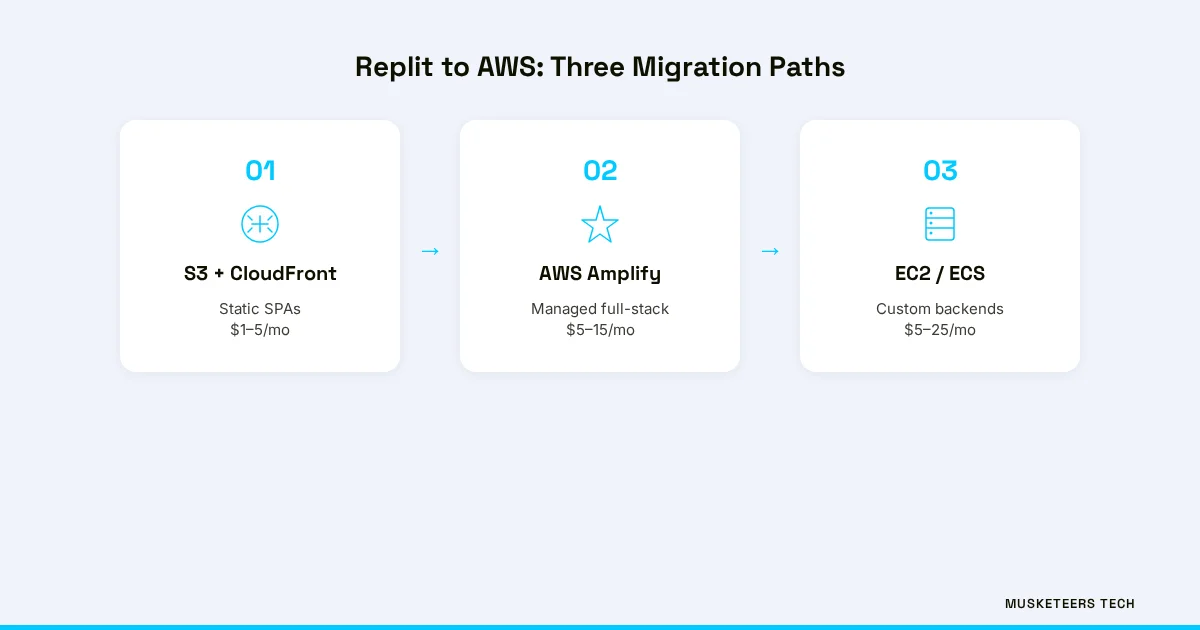
If your Replit app is a pure React/Vite SPA with no server-side code, deploy the built static files to S3 with CloudFront in front for CDN and SSL. This is the cheapest option at $1-5/month.
Best for: Single-page applications where all backend logic lives in an external service (Supabase, Firebase, or a separate API).
Architecture: S3 (origin) → CloudFront (CDN + SSL) → Route 53 (custom domain)
Step-by-Step Migration Process
This is the core walkthrough. The steps vary slightly by deployment path, but the first two are universal.
Step 1 — Export Your Code from Replit
Connect your Replit project to GitHub by clicking the Git icon in the sidebar and pushing to a new repository. Alternatively, download the project as a ZIP from the three-dot menu. Clone the repo locally and verify it runs outside Replit:
git clone https://github.com/your-org/your-replit-app.git
cd your-replit-app
npm install  # or pip install -r requirements.txt
npm start    # or python main.py
If the app runs locally, it can run on AWS. If it fails, check for Replit-specific dependencies in .replit and replit.nix — you may need to install system packages or adjust file paths.
Step 2 — Migrate Environment Variables
Replit stores secrets in the Secrets panel. You need to transfer every key-value pair to your AWS environment. Open the Secrets tab in Replit and document every variable. On AWS, you have three options:
# Option 1: AWS Systems Manager Parameter Store (recommended)
aws ssm put-parameter --name "/myapp/DATABASE_URL" --value "your-connection-string" --type SecureString

# Option 2: AWS Secrets Manager (for rotation-capable secrets)
aws secretsmanager create-secret --name myapp/secrets --secret-string '{"DB_URL":"...","API_KEY":"..."}'

# Option 3: Environment variables in ECS task definition or Amplify console
# Set directly in the AWS Console under your service's configuration
Step 3 — Deploy to AWS
Build your frontend and deploy the static files:
npm run build
aws s3 mb s3://app.yourdomain.com
aws s3 website s3://app.yourdomain.com --index-document index.html --error-document index.html
aws s3 sync dist/ s3://app.yourdomain.com --delete
Then create a CloudFront distribution with an ACM SSL certificate and Route 53 DNS record pointing to your domain. Set custom error responses to return /index.html with 200 status for SPA routing.
Step 4 — Configure Custom Domain and SSL
Register or transfer your domain to Route 53 (or point nameservers from your registrar). Request a free SSL certificate from ACM. Create an A record (alias) pointing to your CloudFront distribution, ALB, or EC2 elastic IP. DNS propagation takes 5-30 minutes.
Step 5 — Verify and Test
Hit your custom domain. Verify that every page loads, API calls succeed, authentication flows work, and database queries return correct data. Check the browser console for errors and test on mobile.
Checkpoint
Your app is now live on AWS with a custom domain. The remaining sections cover database migration, CI/CD automation, and the cost comparison.
Replit vs AWS: Cost and Feature Comparison
Here’s the real-world cost comparison for a typical full-stack application serving 10,000-50,000 monthly users:
| Metric | Replit (Hacker Plan) | AWS Self-Hosted |
|---|---|---|
| Monthly cost | $25/month + overages | $5-15/month |
| Deployment credits | Limited (credit-based) | Unlimited |
| AI Agent credits | Limited | N/A (use your own tools) |
| Custom domain | Requires paid plan | $0.50/zone/month (Route 53) |
| SSL certificate | Included | Free (ACM) |
| CDN edge locations | None (single region) | 400+ global PoPs (CloudFront) |
| Cold starts | Yes (on idle) | No (EC2/ECS always-on) |
| Database | Replit DB or managed Postgres | RDS, DynamoDB, or self-managed |
| Server configuration | None (locked) | Full root access |
| Auto-scaling | No | Yes (ECS, ASG, Lambda) |
| Compliance (SOC 2, HIPAA) | Not available | Available |
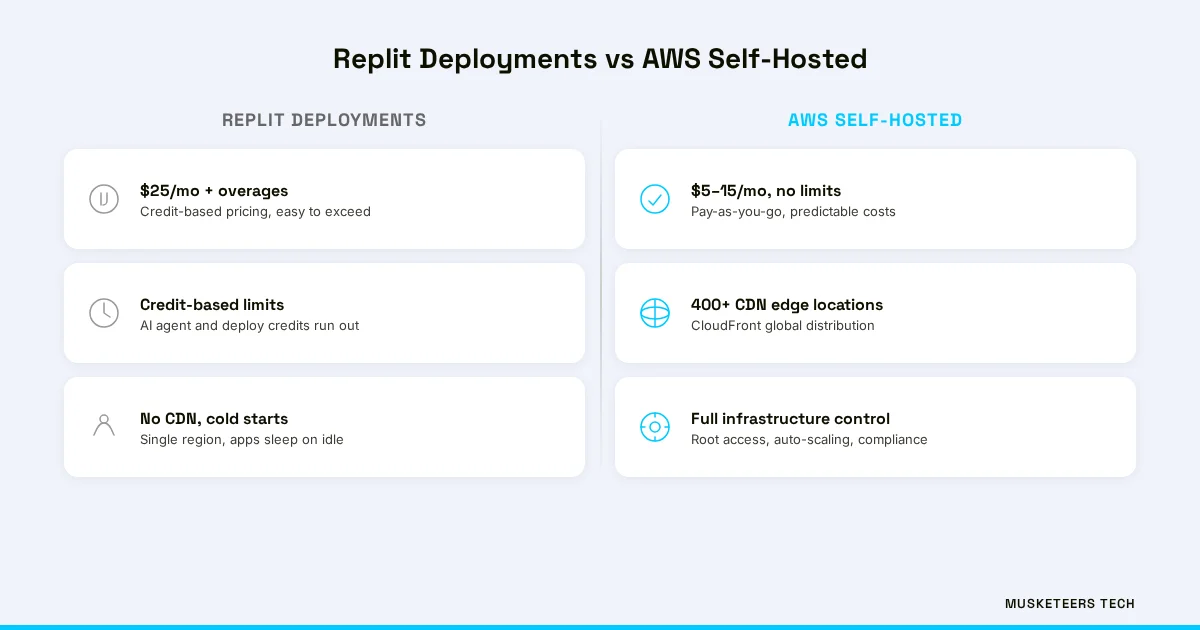
For teams running multiple apps, the savings multiply. Three Replit apps on the Hacker plan cost $75/month with credit limits. The same three apps on a single EC2 t3.small instance cost under $20/month with no limits — and you can optimize that further with reserved instances.
Database and Backend Migration
This is where Replit migrations differ most from frontend-only platforms. Replit offers two database options, and each requires a different migration strategy.
Replit Database (Key-Value Store)
Replit Database is a simple key-value store accessible via the replit npm package or HTTP API. To migrate:
- Export all data — Write a script that iterates over all keys and dumps them to JSON:
const Database = require("@replit/database"); const db = new Database(); const keys = await db.list(); const data = {}; for (const key of keys) { data[key] = await db.get(key); } require('fs').writeFileSync('db-export.json', JSON.stringify(data)); - Choose an AWS target — DynamoDB (key-value, serverless, pay-per-request) or ElastiCache Redis (if you need sub-millisecond reads). For most Replit Database migrations, DynamoDB is the right choice.
- Import the data — Write a script that reads the JSON and batch-writes to DynamoDB.
- Update your app code — Replace
@replit/databasecalls with the AWS SDK’s DynamoDB client.
Replit PostgreSQL
Replit offers managed PostgreSQL through its interface. To migrate to AWS RDS:
- Export with pg_dump — Connect to your Replit Postgres instance and dump the schema and data:
pg_dump -h your-replit-pg-host -U your-user -d your-db -F c -f backup.dump - Create an RDS instance — Launch a
db.t3.micro(free tier eligible) PostgreSQL instance in RDS. - Import with pg_restore — Restore the dump into your new RDS instance:
pg_restore -h your-rds-endpoint -U postgres -d your-db backup.dump - Update connection strings — Replace the Replit PostgreSQL URL in your environment variables with the RDS endpoint.
Test Before Switching
Run your app against the new database in a staging environment before switching production. Check that all queries, migrations, and ORM models work correctly. Replit PostgreSQL and RDS PostgreSQL are the same engine — but connection pooling, SSL requirements, and timeout settings may differ.
For teams planning a larger digital transformation, this is also the right time to evaluate whether your database schema needs optimization, whether you should add read replicas, or whether a different database engine (Aurora, DynamoDB) would better serve your growth trajectory.
CI/CD and Automated Deployments
Replit’s biggest convenience is push-to-deploy from the browser editor. You need to replicate that workflow on AWS so deployments stay fast and friction-free.
Create .github/workflows/deploy.yml:
name: Deploy to AWS
on:
  push:
    branches: [main]
jobs:
  deploy:
    runs-on: ubuntu-latest
    steps:
      - uses: actions/checkout@v4
      - uses: actions/setup-node@v4
        with:
          node-version: 20
      - run: npm ci && npm run build
      - uses: aws-actions/configure-aws-credentials@v4
        with:
          aws-access-key-id: ${{ secrets.AWS_ACCESS_KEY_ID }}
          aws-secret-access-key: ${{ secrets.AWS_SECRET_ACCESS_KEY }}
          aws-region: us-east-1
      # For EC2: SSH and pull
      - run: ssh ubuntu@${{ secrets.EC2_HOST }} "cd /home/ubuntu/app && git pull && npm ci && sudo systemctl restart myapp"
      # For ECS: Build Docker image and update service
# - run: docker build -t myapp . && docker push $ECR_URI && aws ecs update-service --cluster my-cluster --service my-service --force-new-deploymentBoth approaches give you automatic deployments on every push — the same convenience Replit offered, but on infrastructure you control. For teams tracking software development KPIs, deployment frequency and lead time should improve once you’re off credit-limited infrastructure.
Frequently Asked Questions
Connect your Replit project to GitHub using the Git panel in the sidebar, or download the project as a ZIP from the three-dot menu. The GitHub method is preferred because it preserves version history and makes CI/CD setup easier. Once exported, verify the code runs locally by installing dependencies and starting the server.
How Musketeers Tech Can Help
Migrating a simple Replit app to AWS is a weekend project. But when you’re running multiple production apps, managing PostgreSQL databases across environments, or need enterprise-grade infrastructure with monitoring, auto-scaling, and compliance — that’s where software strategy consulting pays for itself. Musketeers Tech has helped dozens of teams transition from rapid-development platforms to production-grade AWS architectures without losing momentum.
We’ve built migration playbooks for teams outgrowing every major development platform — from Replit and Lovable to Bubble and Bolt. Whether you need a one-time migration, ongoing CTO-as-a-Service to manage your cloud infrastructure, or a ground-up web application rebuild, we can help you own your stack without slowing down product development. Take a look at how we approach agile software development and deliver AI-powered solutions that scale.
AWS Cost Optimization
Cut your AWS bill by up to 40% with automated right-sizing, reserved instances, and architecture reviews.
Web Application Development
Production-grade React, Next.js, and full-stack applications deployed on AWS with CI/CD from day one.
Own Your Stack, Own Your Future
Replit got your app off the ground fast — and that’s exactly what it was built for. But every serious product eventually needs infrastructure it controls: custom domains, predictable costs, no cold starts, database access you own, and deployment pipelines integrated with how your team actually works. The migration from Replit to AWS isn’t a rejection of AI-powered development — it’s the natural next step when your product is ready for real users at real scale.
The tools are accessible, the cloud economics are clear, and the process is well-documented right here. Take the weekend, make the move, and ship your product on your terms.
AI-optimized version of this article: Read the text-only version
Last updated: 24 Mar, 2026
